Good afternoon. I ran into an interesting issue this afternoon I wanted to share. I had a customer that was receiving the following error:
“The volume cannot be extended because the number of clusters will exceed the maximum number of clusters supported by the filesystem.”
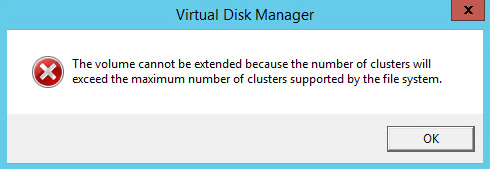
He encountered the error when trying to extend a volume. The volume was 20TB (Terabytes) and he was trying to add another 19TB for a total of 39TB. After some research I found, based on his setup, that the maximum volume size was 32.75TB. We extended the volume to that size and we were done.
I figured someone might find it useful if I l go over the process of determining the maximum size for a volume. There are a couple pieces of key information that are required. The first is the maximum number of clusters in a NTFS volume. This is 2^32 -1 clusters, or roughly 4 billion. The second piece of information we need is the bytes per cluster. To get this information, run the following command: fsutil fsinfo ntfsinfo x:
Replace the x: with the actual drive letter. Below is output from the command. In this example we see that we are using 4096 bytes per cluster or 4K for short.

Now that we have both pieces of information we just need to do some simple math to find the maximum volume size. Multiply the maximum maximum number of clusters by the cluster size. Taking the example above, that would be 4,294,967,295 * 4096 = 17,592,186,040,320 bytes. To convert this to megabytes, divide the number by 1,048,576 (1024*1024). In this example we get 16,777,215 Megabytes.
To make this even easier, here is a handy table:
| Cluster size |
NTFS Max Size |
| 512 bytes |
2,199,023,255,040 (2TB) |
| 1024 bytes |
4,398,046,510,080 (4TB) |
| 2048 bytes |
8,796,093,020,160 (8TB) |
| 4096 bytes |
17,592,186,040,320 (16TB) |
| 8192 bytes |
35,184,372,080,640 (32TB) |
| 16384 bytes |
70,368,744,161,280 (64TB) |
| 32768 bytes |
140,737,488,322,560 (128TB) |
| 65536 bytes |
281,474,976,654,120 (256TB) |
I hope you enjoyed this article. If you have any suggestions or comments please leave them below.


 Glennopedia